
Complete Privacy & Digital Fingerprint Guide
Your all-in-one resource for installing, activating, and mastering PC Privacy Shield on Windows — erase digital traces and protect your identity
What is PC Privacy Shield?
PC Privacy Shield is a comprehensive privacy protection application designed to eliminate your digital footprint. It scans, identifies, and securely deletes digital fingerprints left behind by your online and offline activities — including browser history, cached files, chat logs, recent documents, and tracking cookies. Whether you're a casual user or privacy enthusiast, PC Privacy Shield gives you complete control over your digital identity.
System Requirements
Purchase & License Key
After purchase, you'll receive your unique license key via email. Premium version: $39.99/year — includes full cleaning capabilities.
Install on Windows
Follow these step-by-step instructions for a successful installation

Download installer
Click the download link above and save the .exe file to your preferred location.
Run installer
Double-click the downloaded file. Click "Yes" when Windows asks for permission.
Follow wizard
Complete the installation wizard. The program will open automatically when finished.
First scan runs
An automated first scan will start immediately, reporting any privacy issues found.
Register & Activate Your License
Unlock full cleaning features by following these steps
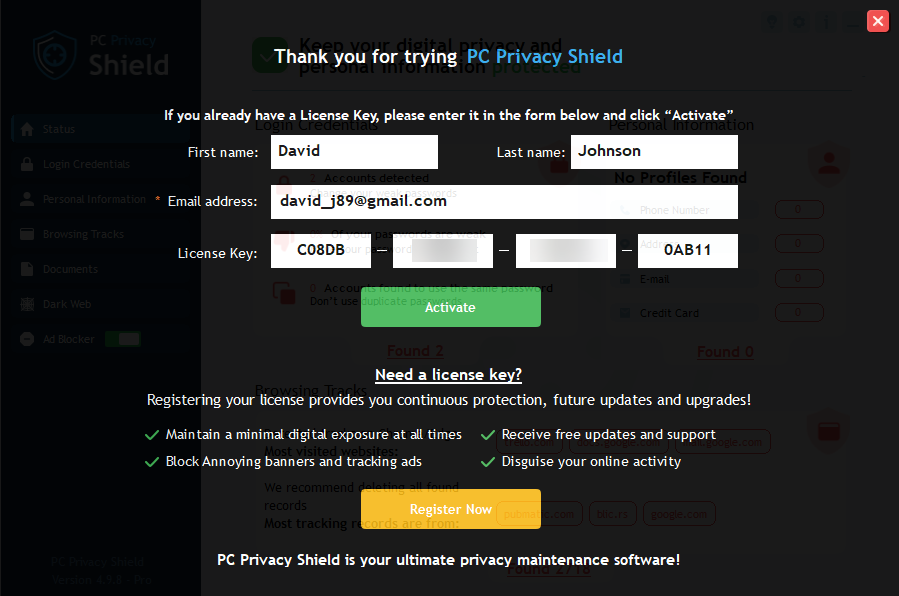
Activation window — enter your license key here
Locate "Register Now" Button
Open PC Privacy Shield. In the lower-right corner of the application, you'll find the yellow "Register Now" button. Click it.
Enter Details & Activate
Fill in your first name, last name, and email address (must match purchase email). Copy your license key and paste it into the activation box.
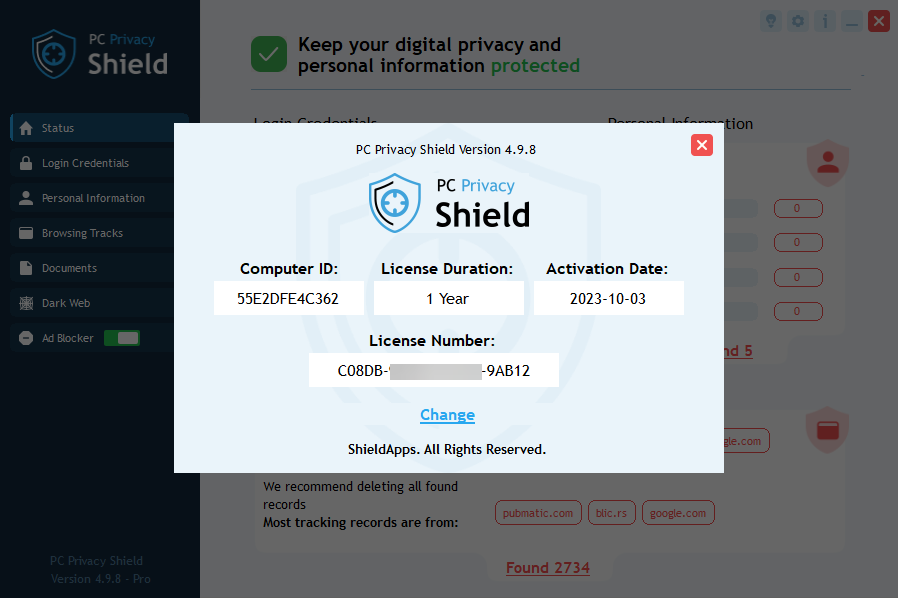
License Information panel — check your expiration date
Activation Troubleshooting
- Invalid key: Copy exactly without extra spaces or dashes
- Email not recognized: Use the exact email from your purchase receipt
- Free version limitations: Free version scans & reports but does NOT delete entries. Upgrade to Premium to clean.
- Still issues? Contact support via the banner at the bottom
Find Your License Information
Check your license status and expiration date in seconds
How to Clean Digital Fingerprints
Remove traces of your online and offline activities with one click
How to Uninstall PC Privacy Shield
Complete removal guide for Windows — two methods available
Automatic Uninstall (Recommended)
- Click Start → type "Add or Remove Programs"
- Find PC Privacy Shield in the list
- Click → Uninstall
- Follow the on-screen wizard until finished
Manual Uninstall (Control Panel)
- Open Control Panel → Programs
- Click Uninstall a Program
- Select PC Privacy Shield
- Click Uninstall and follow prompts
 Português
  Français
  Español
  Italiano
  Deutsch
  English